

0:00
Hey everyone, uh I'm Gil Pelleg and
0:02
today I'm going to show you how we use
0:05
the Genius Genai framework to extend the
0:08
Microsoft Copilot with mainframe
0:10
capabilities.
0:11
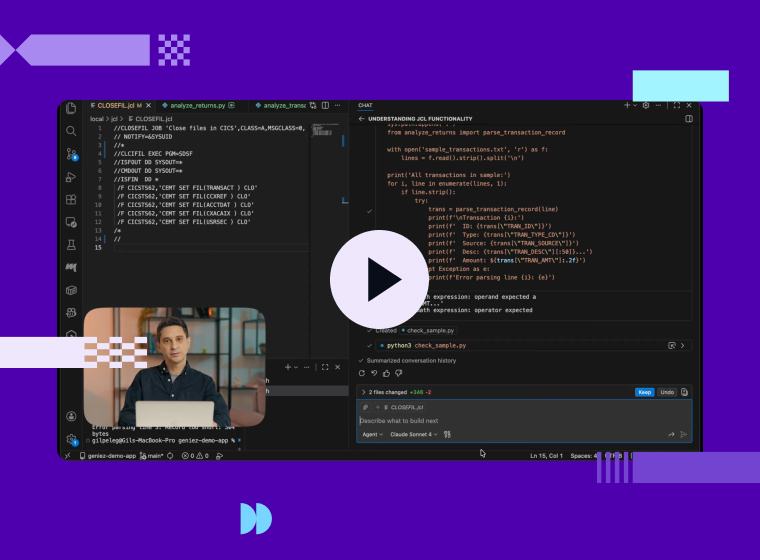
So as you can see on my screen, I got
0:13
Copilot open uh on the right hand side.
0:16
It's connected to Cloud Sonet 4 and as
0:20
you can see it's also connected to the
0:22
Genius Gai framework with a long list of
0:25
mainframe capabilities.
0:27
Uh you can see on the left hand side I
0:29
have a mainframe application opened. I
0:32
have some uh cobble source files. I have
0:35
copy books. I have JCL source code as
0:39
you can see right here on my screen. And
0:42
I'm going to start with asking copilot
0:45
to explain what this JCL does. So I'm
0:48
going to type that uh in the chat
0:50
window.
0:58
And this is a basic capability of
1:00
copilot. It's going to look at the JCL
1:03
and explain what it does.
1:15
And as you can see, it came back and
1:17
it's explaining that this JCL closes
1:20
some CACs data sets. It's giving me the
1:23
list of data sets and which command is
1:26
used to close the data set. This is a
1:28
pretty standard uh CICS batch
1:31
application job. So now I'm going to ask
1:34
it to submit it. And this is already a
1:37
genius genai capability because uh
1:40
Microsoft Copilot cannot submit jobs on
1:43
its own. Right? So I'm going to type in
1:48
So I can even ask it to check whether
1:50
the job was successful once it's
1:52
submitted. So here it goes.
2:01
And as you can see it's using the genus
2:03
GI framework to submit the job.
2:07
It came back with a job ID and the job
2:09
name. And it says the job was
2:11
successfully submitted. And I'm going to
2:13
ask it to check whether the job was
2:16
successful.
2:20
And again, it's running the genius jai
2:23
framework to check the job output on the
2:25
spool.
2:27
And as you can see, it comes back and
2:28
says the job has completed. And it's
2:31
checking for any messages.
2:43
All right. So, it's coming back and
2:44
telling me that the job is actually
2:46
failed with an error message. Module
2:50
SDFS not found. Oh, that that seems to
2:53
be a typo on my end. So, I can ask it to
2:56
fix the program name.
3:02
Right. So, it is suggesting the fix to
3:04
the JCL. I'm going to tell it I want to
3:06
keep the update to the program name. It
3:10
fixed the JCL and it submitted the job
3:12
again.
3:16
And I'm going to ask it to check whether
3:19
the job was successful this time. And
3:21
again, it's going to go to the spool to
3:24
list the job output and check whether
3:26
the job was successful or were there any
3:28
error messages.
3:32
All right. So as you can see it found
3:34
the job output and it figure out the job
3:38
has completed successfully with a return
3:40
code zero.
3:42
That's great. All right. Now I want to
3:45
understand a little bit deeper what this
3:47
job has done. So I'm going to ask it uh
3:50
if it can show check the job output and
3:52
tell me which data set is actually
3:55
connected to the CCS file transact.
3:59
Right.
4:04
This is a bit more complex task as it
4:06
requires copilot to dive deeper into
4:09
analyzing the output of the job and try
4:12
to understand which data set is actually
4:14
being used. All right. And it's coming
4:16
back and telling me that this is the
4:18
data set name transact vom ksds.
4:22
Now I want to try and understand the
4:24
structure of this file. I seem to recall
4:27
I have a copy book uh mapping this data
4:30
set, but I'm not sure which copy book
4:33
that actually is. So, I'm going to ask
4:35
Copilot to search for it and try to see
4:37
if it can find which copy book maps this
4:40
uh VSON data set.
4:55
And as you can see, it searched through
4:57
the project and found the rhythmi file
5:00
and figured out that this uh copy book
5:03
vt05y
5:07
is the one that's actually mapping the
5:09
vess data set.
5:13
Right now, I seem to recall I have that
5:15
copy book on my main frame. So, I'm just
5:17
going to ask copilot to make sure it's
5:20
actually there.
5:29
So now it's going to use the genius
5:30
genai framework to go to the main frame
5:33
and list a PDS and check whether it has
5:36
a member by that name.
5:40
All right. And it came back and says
5:41
yes, I found the copy book in this PDS.
5:45
So now I'm going to uh ask copilot to
5:49
actually map the vis data set from the
5:51
main frame with the copy book and show
5:54
me the content of the vis data set
6:00
and again this is something that copilot
6:02
cannot do on its own and it's going to
6:04
call the genius generi framework to
6:07
retrieve the copy book retrieve the vis
6:09
data set and then parse the data set
6:12
based on the copy
6:15
All right. And it came back and it's
6:17
showing us a couple of sample records
6:19
from the VSM data set. But I'm actually
6:22
interested in the record with the
6:24
highest purchase amount. So I'm going to
6:26
ask it to show it. And I'm asking it to
6:29
list a record in the data set. But I'm
6:31
not actually telling it the schema of
6:34
the data set or the structure of the
6:35
data set. I'm just using my application
6:40
uh terms to ask it what to do and it
6:43
will figure it out based on the copy
6:45
book.
6:47
All right. And here we go. As you can
6:49
see, it came back and it located the
6:51
transaction with the highest purchase
6:53
amount of $504.
6:56
All right. So, we looked at the
6:58
application level at the records in the
7:01
VSSON data set. Now I'm interested in a
7:04
little bit more technical details about
7:06
the data set. So I'm uh I'd like to list
7:09
the attributes of the data set. So I'm
7:11
going to ask Copilot to generate an
7:13
IDAM's JCL and run it on the mainframe
7:16
for me to list the attributes.
7:23
All right. And as you can see, it
7:25
generated its own JCL, submitted it, and
7:29
uh checked the output and came back and
7:31
it's showing me the data set name, the
7:34
type of the data set, which catalog it's
7:36
on, the size of the data set, the key
7:39
length, the record length, and many
7:42
other technical details about the data
7:44
set. All right, so we looked at the
7:47
application vis data sets. Now, I want
7:49
to check the application database
7:51
tables. So I'm going to ask copilot
7:54
whether it can access DB2 for me.
8:00
And as you can see it came back and say
8:02
that through the genius geni framework
8:04
it has access to a bunch of uh DB2
8:07
capabilities. So I'm just going to ask
8:10
it to look at the employees table for
8:12
me. So I'm going to type in
8:16
and I'm asking it to list all employees
8:19
in the table. And as you can see, it
8:22
used the Genius GNI framework to
8:24
generate an SQL query to list all the
8:27
employees in the table. I can try and
8:30
dive a bit deeper into the application
8:32
data. For example, I'm going to ask it
8:35
to list the top three employees with
8:37
highest salaries. And as you can see, it
8:40
came back with the list of three
8:41
employees with the highest salaries. And
8:44
as you noticed, I did not have to tell
8:46
it the schema of the table or how to
8:48
access the database. It figured it all
8:50
out through its own uh using the Genius
8:54
Gai framework. All right, so that's all
8:57
I had today. Uh in this demo, we showed
8:59
you how we use the Genius Genai
9:01
framework to extend Microsoft Copilot
9:04
with mainframe capabilities. For
9:06
example, submitting jobs, looking at VSM
9:09
data sets based on cobalt copy books or
9:12
querying DB2 tables. If you'd like to
9:15
learn more, you're welcome to visit our
9:17
website where we have a lot more
9:19
resources and videos for you. Thank you.
All
From Geniez AI